BETTING ESSENTIALS - CC says: "Betting Essentials helps readers understand not just what to look for, but why it matters."

Warren Block's Daily Report - Friday, 5 June 2026
- Jockey-Trainer provincial stats - five states - Spotlight on Jean Van Overmeire
- Matrix day-by-day results for Friday and Saturday racing
- Wizard Freebie - The Wizard Matrix Report
- Wizard Ratings, Raceday, Matrix, and Selectives Results
Jockey-Trainer provincial statistics - five states - Spotlight on Jean Van Overmeire
Today, jockeys in each of the five mainland states who are currently prominent in their state 2025-2026 provincial premiership, with the stats covering the past two years. Note, however, that these stats cover the rider's results in all races, irrespective of location.
The Jockey/Trainer combinations that are included are based on the following criteria: The Jockey/Trainer combination is listed when a jockey's record shows at least 2 wins when riding the Wizard top-rater, or at least 3 wins when riding the race favourite, or 4 wins if the runner is in the $2.00 to $5.90 odds range, for that stable. Also included are the overall percentage stats for the jockey when riding a Wizard top rater or race favourite, for any stable.
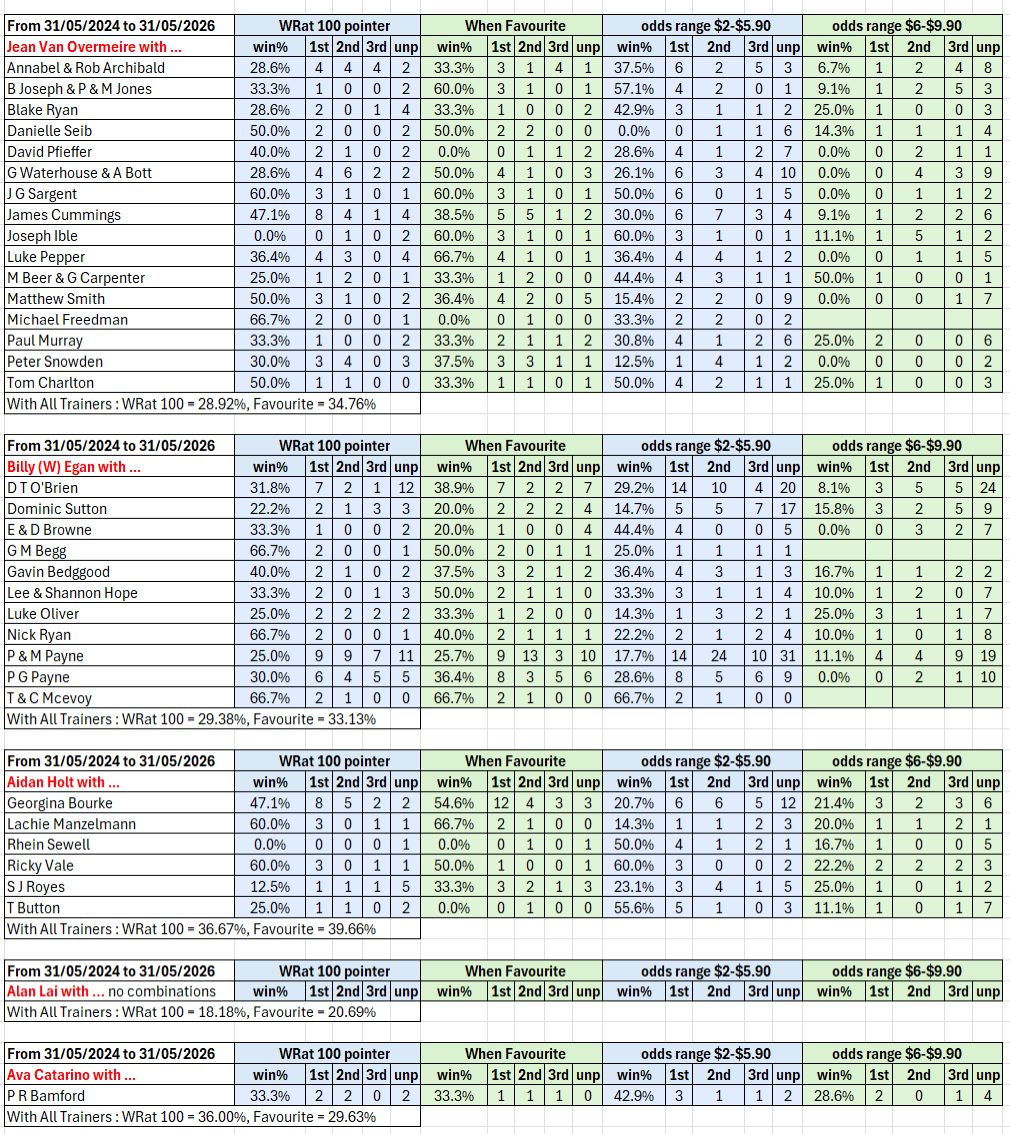
To add to this weekly report, here is a Spotlight Profile of Jean Van Overmeire (via ChatGPT, and other sources) which makes for some interesting reading.
Jean Van Overmeire is a South Africanborn, Sydneybased jockey who has built a strong reputation in New South Wales through consistent success with a wide range of stables.
Early life and family background
Jean Van grew up on a farm near Bloemfontein in South Africas Free State province, where his affinity with horses began on ponies rather than thoroughbreds. Later, his mother and brother migrated with him to the United Kingdom to join his father, allowing him to take his first structured steps into the racing industry at Newmarket. He was apprenticed to Roger Varian, who had taken over the Michael Jarvis yard, and rode his first winner, Emkanaat, at Wolverhampton in September 2012. Racing NSW feature (PDF) johntapp.podbean
Path into professional racing
Seeking broader experience, Jean contacted trainer Mike de Kock in Dubai and secured a job riding work in Dubai. In Dubai he met Jack Bruce, who would later become racing manager for Warwick Farm trainer Bjorn Baker and encouraged Jean to try his luck in Australia. Jean arrived in Sydney in 20152016, but visa complications meant he could not ride in races for almost a year, forcing him to build his reputation through trackwork and trials. His first Australian race winner came at Sapphire Coast on 7 August 2016 aboard Our Brown Eyed Gal. However, his early momentum was interrupted by a fall in November that year which sidelined him for several months. He posted his maiden Sydney metropolitan success in June 2017 on Samadoubt for Bjorn Baker. Over time he completed his apprenticeship with both Bjorn Baker and Randwick trainer Anthony Cummings. racingnsw.com Racing NSW feature John Tapp Racing article
Riding bases and main locations
Jean is based in Sydney and has become a regular winner across the metropolitan, provincial and country circuits of New South Wales. In the the 2024-2025 season he was 9th in the NSW Jockeys' Country Premiership with 65 wins and a 13.5% strike rate, and 2nd in the NSW Jockeys' Provincial Premiership with 35 wins and a strike rate of 10.1%. He has also taken shortterm opportunities overseas, notably in Dubai.
Key trainer associations
Bjorn Baker was one of Jean's most important supporters, providing his first Sydney city winner with Samadoubt. More recently he has enjoyed success for the Gai Waterhouse and Adrian Bott partnership, Annabel and Rob Archibald, James Cummings, and Luke Pepper. He rides for a broad spread of NSW trainers.
Major wins and career highlights
Jean's most important success to date was his Group 2 victory on Glistening for trainer Richard Freedman in the Reisling Stakes at Randwick in March 2021, his first Grouplevel win and a key blacktype breakthrough.
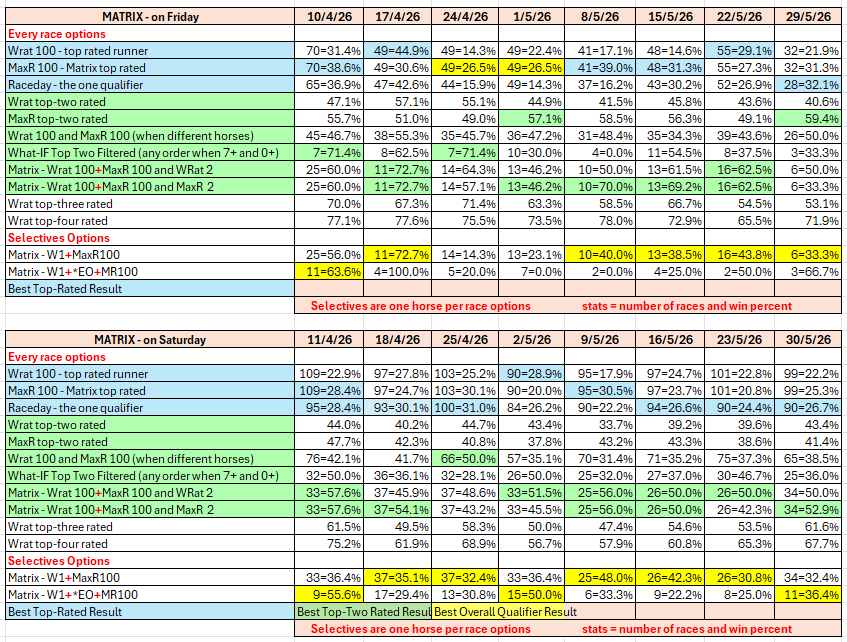
Matrix day-by-day results for Friday and Saturday racing
The tables show the results for the past eight weeks for the day on which racing occurred. So, today being Friday, this Matrix DOW (Day of Week) report covers the past eight Friday and Saturday results. The day-after results are included so that they are available on race-eve, rather than only on race morning.
(The daily Matrix report aims to assist subscribers contain the number of bets to manageable proportions and improve the strike rate. The report is posted to our website between 10:30am and 10:45am each day with an update at 12 noon.)
Wizard Freebie - The Wizard Matrix Report
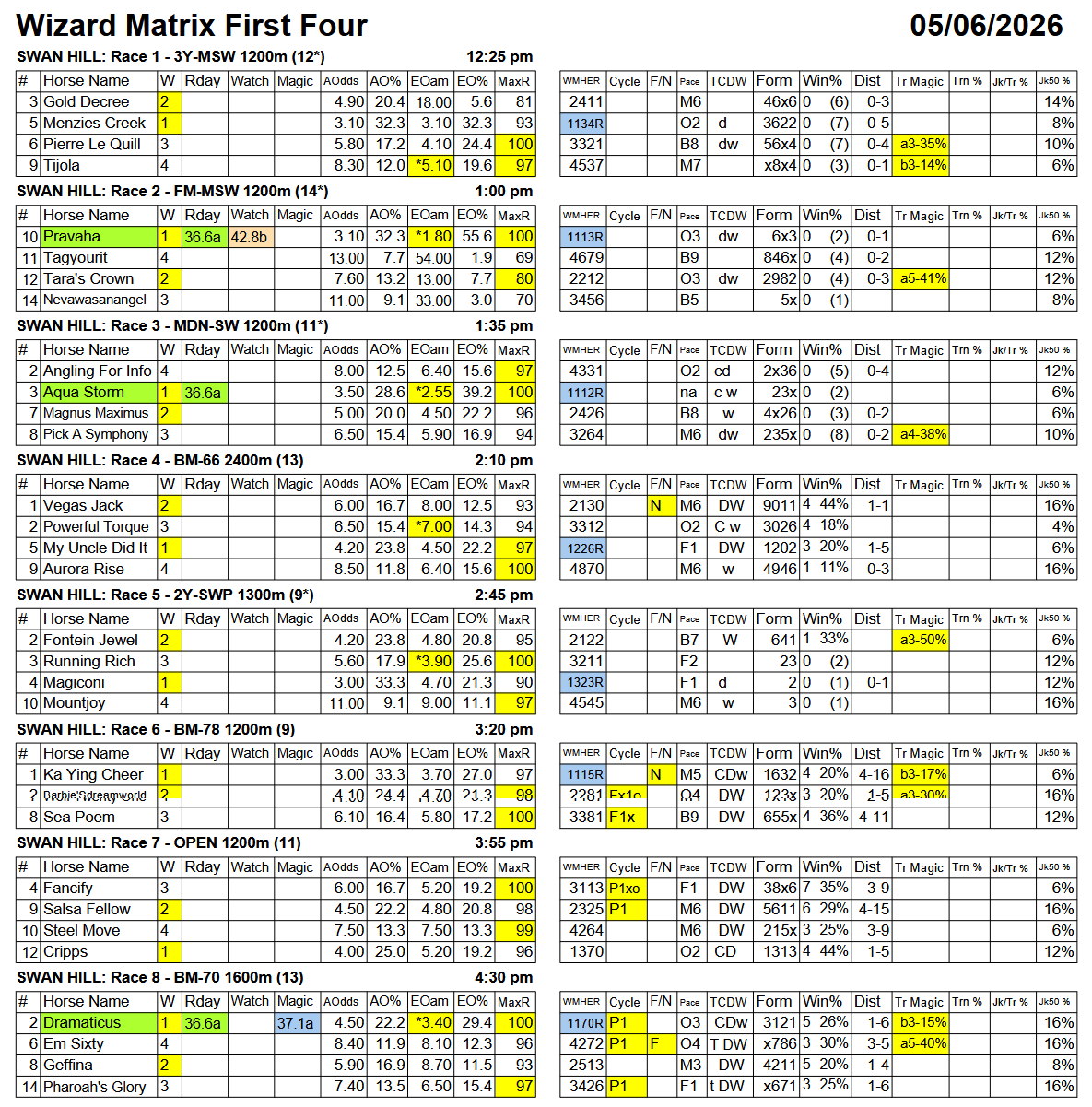
The Wizard publishes on this page one of its Wizard reports or special features, either completely or a part thereof. Today, a Wizard Matrix (First Four) Report for one meeting. The full report and all other reports for all meetings for today are available now for subscribers
The Wizard Matrix report aims to assist subscribers contain the number of bets to manageable proportions and improve the strike rate.
Click here for an explanation of the Wizard Matrix report.
Wizard Ratings, Raceday, Matrix, and Selectives results
We publish these full results daily so that subscribers can see the results of the Wizard's ratings options, and Report-content, and thereby formulate a selecting and betting strategy that suits them individually. The Wizard ratings should not be seen as "tips", rather as objective assessments that can be used to inform one's own judgement as to the relative chances of the runners in a race.
The full day-by-day results for Wizard (Wrat) top 4 rated runners, the Raceday Qualifier, and the Matrix (MaxR) 100 pointer, the MaxR top-two, the What-IF top-two Filtered, together with the Matrix W1+MaxR100 Selective qualifier, and the Matrix W1+*EO+MaxR100 Selective qualifier. Also included are the overall results for last week and the last four weeks. The 2024-2025 column shows the WRat results for the full racing season.
This results summary is colour coded so that it is easier for readers to track the relative performance of the Top Rated (blue) and Top-Two Rated (green) ratings options on a daily, and longer term, basis. The best overall qualifier (yellow) is highlighted. Also, the single runner options are grouped separately, as are the two-horse and multi-horse options results, again to make comparisons easier.
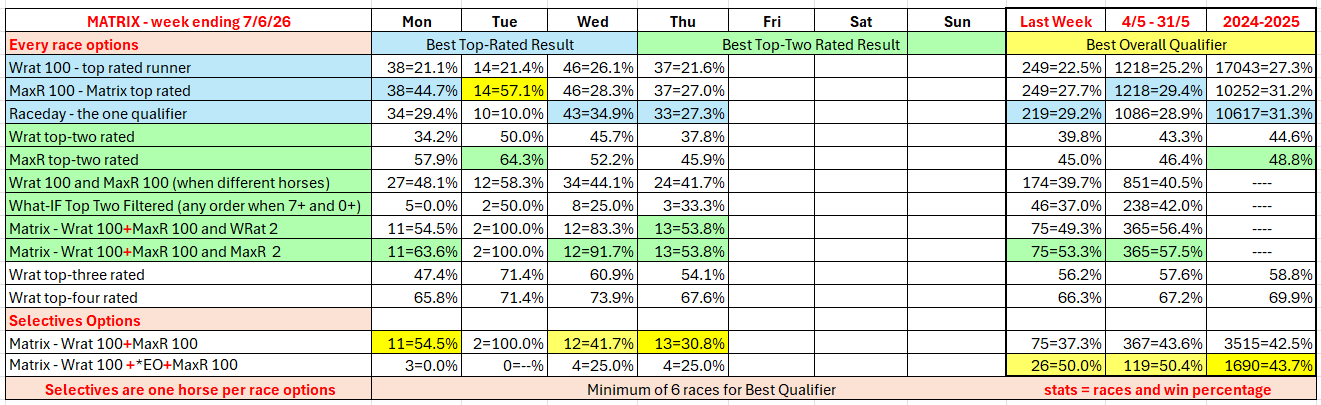
The following table shows this week's results of alternative options with respect to possible Matrix Selectives combinations, as well as weekly summaries. These combinations are accessible via the Wizard MATRIX report which is posted to our website between 10:30am and 10:45am each day.
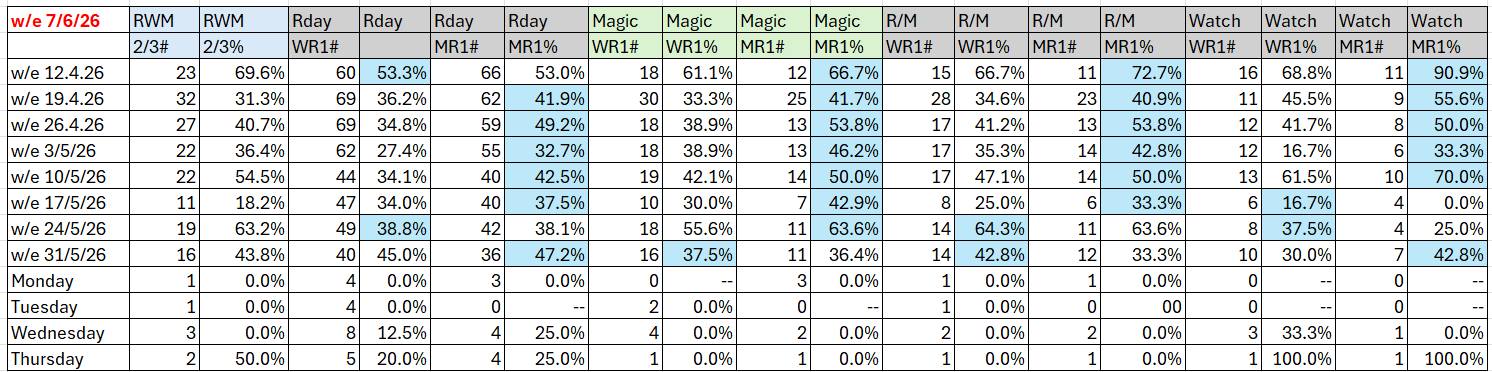
(Key: The first of the two columns for each Selective combination shows number of qualifying races and the second column shows the strike rate. Headings: RWM is Raceday,Watch,Magic, RWM 2/3 means two or three qualifying, Rday is Raceday report qualifier , Magic is Magic report qualifier, R/M is Raceday and Magic, WR1 is Wrat 100, MR1 is MaxR 100.)
The following table shows where the winner of each race run yesterday was rated by WRat, WMod, WHcp, and WExpk and was the qualifier in the Wizard Raceday Report. (Note: The Wrat [W] winner results report on both the top rated and top-two rated winners.) The Raceday Report winners under the Top Rated column are from those races where there was only one Raceday qualifier, and under the Top 2 Rated on the rare occasions where there were two qualifiers in a race.

Header: WMHER = WRat (W), WMod (M), WHcp (H), WExpk (E), Raceday (R).
For a full explanation of the table click: How to read the Wizard Ratings Results