BETTING ESSENTIALS - IM says: "The money management and staking chapter is vital for any success".
Warren Block's Daily Report - Wednesday, 3 June 2026
- The "winningest" trainers report - Spotlight on Fred Wieland
- Wizard Freebie - Wizard Watch report
- Matrix - day by day analysis of Wednesday & Thursday racing
- Wizard Ratings, Raceday, Matrix, and Selectives Results
Australia's "winningest" trainers last week - Spotlight on Fred Wieland
Here is the list of trainers who trained at least a double at any of the Tab meetings last week, along with the jockeys for who rode the winners. This table is colour coded to highlight the outperformers and it is worth noting these stables and the combinations.
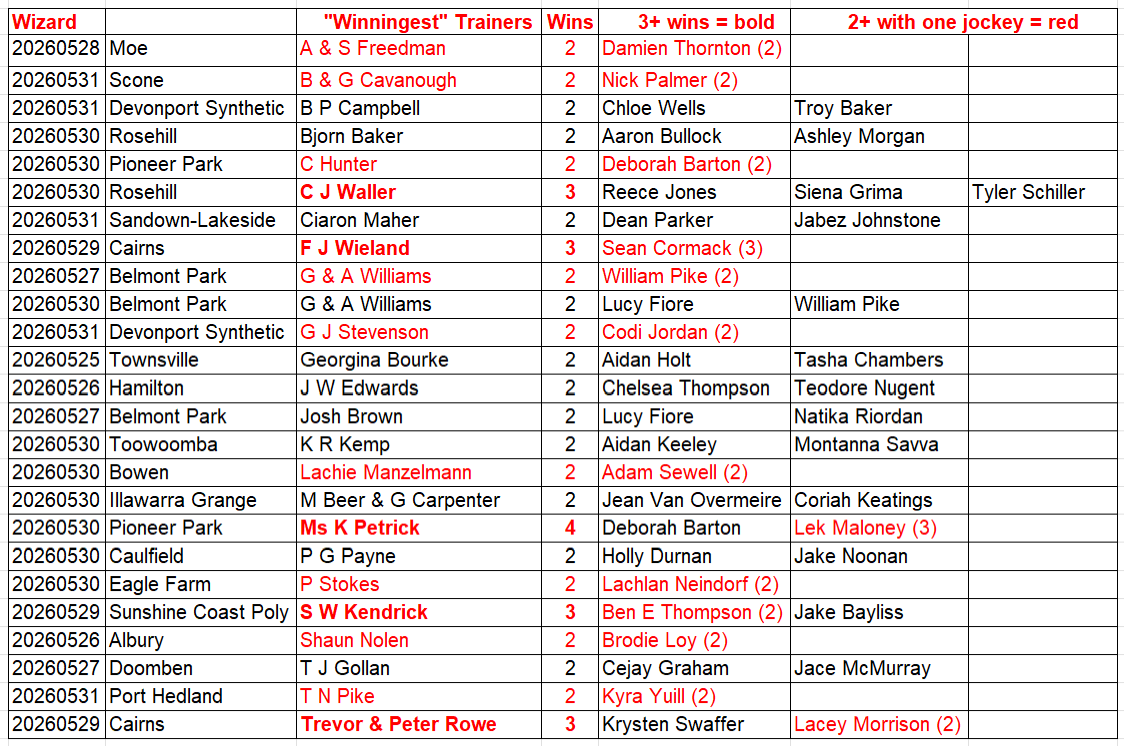
A key factor to be considered in selection-making is the stable, and the trainer-jockey combination. The Wizard weekly "winningest" trainer report is a valuable guide as to which stable/trainer and jockey-trainer combination is currently in form.
To add to this weekly insight, we SPOTLIGHT a particular stable and post an in-depth coverage of its record with different riders, over a period of two years.

Here is the Spotlight on Fred Wieland (via ChatGPT and other sources), which makes for some interesting reading
Fred Wieland (F. J. Wieland) is a longestablished North Queensland trainer based in Cairns.
Early life and family background
Fred has been around horses for most of his life, starting out helping his father around the stables when he was young. When his father became ill, he took the step into fulltime training and has remained a fixture of the North Queensland scene for more than 35 years. His first recorded winner was Practical Flyer in 1998. The family involvement with racing has continued into the next generation, with his son Neil taking out his own licence and stepping into the training ranks. Neil purchases horses online to race within the family, giving Fred and his wife shares in stable acquisitions like the proven performer Perovic. racingqueensland.com
Location of stables and operation
Fred trains out of Cairns via FJ Wieland Racing Stables. His runners are regulars at Cannon Park (Cairns), Townsville, and other country circuits, reflecting a program built around the North Queensland racing calendar and its associated cups and feature meetings. breednet.com
Jockeys closely associated with the stable
Over time, Fred has formed productive associations with several riders. A notable modern partnership has been with South African born Group1 winning jockey Sean Cormack, who became a fly-in fly-out rider for the Cairns stable after Gold Coast jockey Jason Taylor was injured; the pair have enjoyed success together across the North Queensland carnivals. Sean has ridden key horses such as Stadium Of Light in features like the Cairns carnival events. racingqueensland.com
Major wins and career highlights
Racing Queensland describes Fred as having achieved almost everything there is to win in North Queensland across a 35-year training career, including a host of country Cups. One of his headline successes was winning the Cairns Cup with Super Blitz in 2006, a signature staying event at Cannon Park and a key highlight of the Cairns carnival. The Townsville Cup and Cleveland Bay Handicap are still two major North Queensland goals.
Fred's career statistics reflect his longevity and consistency. Across 3,110 career starts, he has recorded 381 wins and 1,142 placings, producing a career win rate of approximately 12-13%. Racenet Punters.com.au racingqueensland.com
Training approach, horse placement and preparation
Fred's background as a farrier and lifelong horseman underpins a practical, hands-on training style, with an emphasis on soundness, toughness and suitability to North Queensland conditions. He is renowned for a patient approach, openly noting that mature five-year-old sprinters often require a few runs to safely reach their physical peaks. His willingness to buy tried horses such as Perovic for modest sums (around $4,000 online) and improve them into multiple winners shows a placement-focused approach. The strategic use of experienced jockeys such as Sean Cormack suggests a strong focus on getting horses ridden to pattern and conditions, which is crucial on North Queensland tracks that can vary significantly with weather and rail position. capeyorkweekly.com racingqueensland.com
(If you would like to see a particular trainer profiled in SPOTLIGHT let me know via Everyrace Support contact.)
Wizard Freebie - Wizard Watch report
The aim of the Wizard Watch report is to highlight on race-morning which horses have been the most significant firmers overnight and earlier on race-morning. This Wizard freebie is an extract of this report featuring some of the venues being covered today. The full report is available with the other Wizard "market sensitive" reports at 10:30am each day.
Wizard monitors race morning market trends over the first 3 hours of race day betting to determine which horses are anticipated to run above earlier pre-post expectations and which horses have had their higher probabilities confirmed.
Given the significance of this early/informed market action, the odds about the Wizard Watch Morning Movers naturally skew towards the shorter odds, but this is compensated by the strike rate. Double figure odds about successful Market Movers are rare, but each-way odds winners are backable.
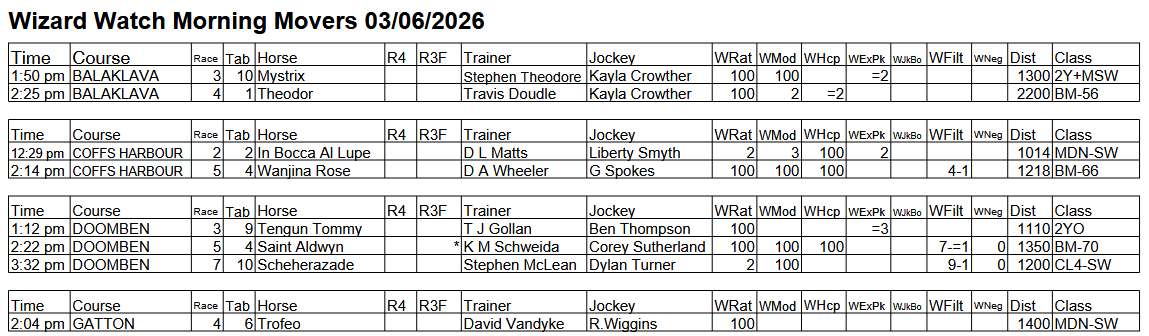
Click here for an explanation of Wizard Watch.
As well as Wizard Watch runners populating its "stand-alone" element of Wizard, Watch qualifiers are also highlighted in Wizard's unique Matrix Report. When these Watch qualifiers are also a WRat 100 pointer or a MaxR 100 pointer in Matrix they tend to out-perform on a consistent basis.
Matrix - day by day analysis of Wednesday & Thursday racing
The tables show the results for the past eight weeks for the day on which racing occurred. So, today being Wednesday, this Matrix DOW (Day of Week) report covers the past eight Wednesday and Thursday results. The day-after results are included so that they are available on race-eve, rather than only on race morning.
(The daily Matrix report aims to assist subscribers contain the number of bets to manageable proportions and improve the strike rate. The report is posted to our website between 10:30am and 10:45am each day with an update at 12 noon.)
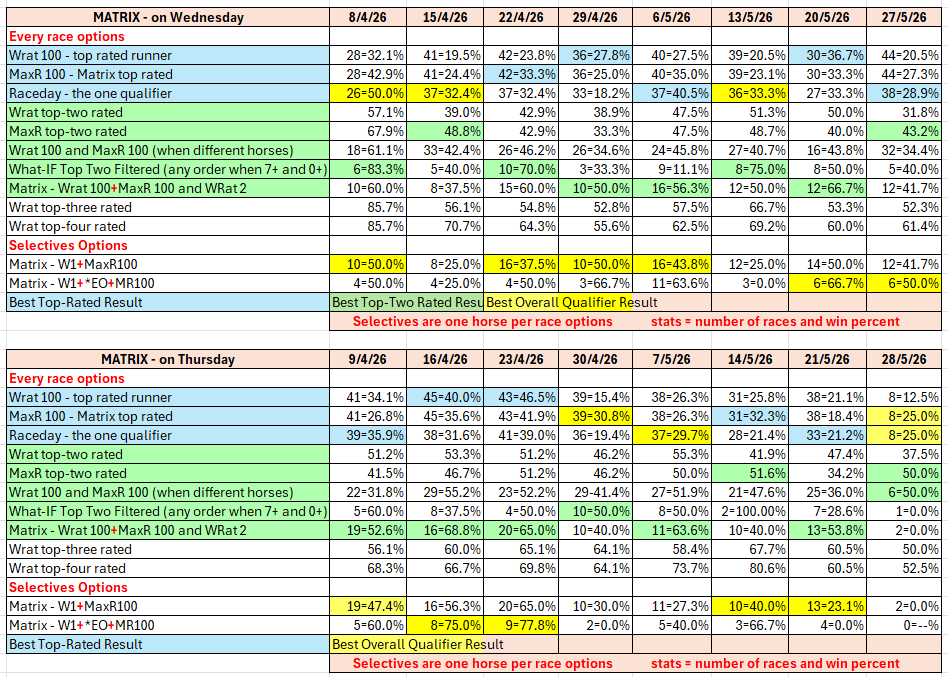
Wizard Ratings, Raceday, Matrix, and Selectives results
We publish these full results daily so that subscribers can see the results of the Wizard's ratings options, and Report-content, and thereby formulate a selecting and betting strategy that suits them individually. The Wizard ratings should not be seen as "tips", rather as objective assessments that can be used to inform one's own judgement as to the relative chances of the runners in a race.
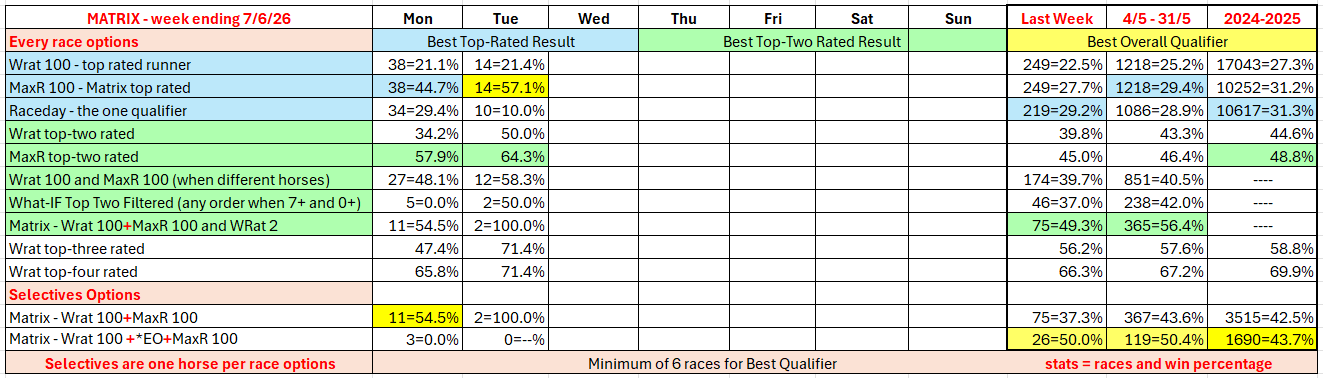
The full day-by-day results for Wizard (Wrat) top 4 rated runners, the Raceday Qualifier, and the Matrix (MaxR) 100 pointer, the MaxR top-two, the What-IF top-two Filtered, together with the Matrix W1+MaxR100 Selective qualifier, and the Matrix W1+*EO+MaxR100 Selective qualifier. Also included are the overall results for last week and the last four weeks. The 2024-2025 column shows the WRat results for the full racing season.
This results summary is colour coded so that it is easier for readers to track the relative performance of the Top Rated (blue) and Top-Two Rated (green) ratings options on a daily, and longer term, basis. The best overall qualifier (yellow) is highlighted. Also, the single runner options are grouped separately, as are the two-horse and multi-horse options results, again to make comparisons easier.
The following table shows this week's results of alternative options with respect to possible Matrix Selectives combinations, as well as weekly summaries. These combinations are accessible via the Wizard MATRIX report which is posted to our website between 10:30am and 10:45am each day.
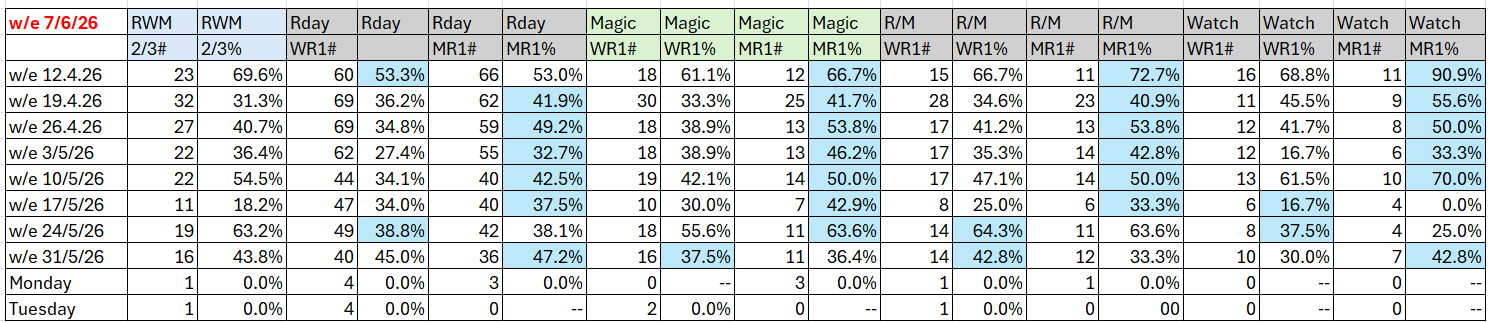
(Key: The first of the two columns for each Selective combination shows number of qualifying races and the second column shows the strike rate. Headings: RWM is Raceday,Watch,Magic, RWM 2/3 means two or three qualifying, Rday is Raceday report qualifier , Magic is Magic report qualifier, R/M is Raceday and Magic, WR1 is Wrat 100, MR1 is MaxR 100, Watch is a Watch report qualifier.)
The following table shows where the winner of each race run yesterday was rated by WRat, WMod, WHcp, and WExpk and was the qualifier in the Wizard Raceday Report. (Note: The Wrat [W] winner results report on both the top rated and top-two rated winners.) The Raceday Report winners under the Top Rated column are from those races where there was only one Raceday qualifier, and under the Top 2 Rated on the rare occasions where there were two qualifiers in a race.

Header: WMHER = WRat (W), WMod (M), WHcp (H), WExpk (E), Raceday (R).
For a full explanation of the table click: How to read the Wizard Ratings Results